
BGP configuration is quite different from other routing protocols configuration. There are two kinds of BGP, which are IBGP and EBGP. EBGP is when BGP is configured between routers in a different Autonomous System (AS), IBGP is when BGP is configure between routers within the same AS. EBGP behaves differently from IBGP. We will see what other differences are as we configure BGP in the following topology.
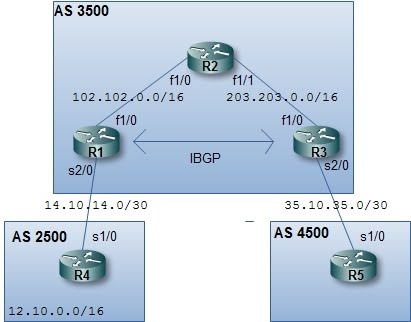
In BGP we have to specify each of our neighbor manually and the network command work differently as with other routing protocol. We will start by configuring every interface and start BGP in each router.
R1
interface FastEthernet1/0
ip address 102.102.0.1 255.255.0.0
no shutdown
interface Serial2/0
ip address 14.10.14.1 255.255.255.252
no shutdown
interface loopback0
ip address 1.1.1.1 255.255.255.255
router bgp 3500
R2
interface FastEthernet1/0
ip address 102.102.0.2 255.255.0.0
no shutdown
interface FastEthernet1/1
ip address 203.203.0.1 255.255.0.0
no shutdown
R3
interface FastEthernet1/0
ip address 203.203.0.2 255.255.0.0
no shutdown
interface Serial2/0
ip address 35.10.35.1 255.255.255.252
no shutdown
interface loopback0
ip address 3.3.3.3 255.255.255.255
router bgp 3500
R4
interface loopback0
ip address 12.10.0.1 255.255.0.0
no shutdown
interface Serial1/0
ip address 14.10.14.2 255.255.255.252
no shutdown
router bgp 2500
R5
interface Serial1/0
ip address 35.10.35.2 255.255.255.252
no shutdown
router bgp 4500
At this point, you can run the "show processes" or only "show processes | include BGP" (the BGP should be in upper case) command to see that BGP processes is running. You can also use the "show processes cpu | include BGP" to see the cpu usage instead of the memory usage.

Now, all interfaces have been configured and BGP processes are running. We can now make them BGP neighbor. There could be two type of BGP neighbor, IBGP or EBGP neighbor. EBGP neighbor is a neighbor of which AS number is different from the AS number of the configured router. First we will configure EBGP peers between R1-R4 and R3-R5. Neighbor in BGP should be configured manually, here is the configuration (enter the configuration at each BGP )
R1
router bgp 3500
neighbor 14.10.14.2 remote-as 2500
R4
router bgp 2500
neighbor 14.10.14.1 remote-as 3500
R3
router bgp 3500
neighbor 35.10.35.2 remote-as 4500
R5
router bgp 4500
neighbor 35.10.35.1 remote-as 3500
At this point, you can verify the BGP neighbor status with "show ip bgp neighbors" or "show bgp summary ". Here's the example of running "show bgp summary " in R1

Now, we will configure IBGP peer between R1-R3. Notice, that I create a loopback interface on R1 and R3, so instead of using a physical interface to make a peer between R1-R3, we will use that loopback interfaces. But, we won't be able to do that before telling each other how to get to peer loopback interface. We can do this by using a static route or a routing protocol. In this case, we will use OSPF. So, let's configure OSPF
R1
router ospf 1
router-id 1.1.1.1
log-adjacency-changes
network 1.1.1.1 0.0.0.0 area 0
network 102.102.0.0 0.0.255.255 area 0
R2
router ospf 1
router-id 2.2.2.2
log-adjacency-changes
network 102.102.0.0 0.0.255.255 area 0
network 203.203.0.0 0.0.255.255 area 0
R3
router ospf 1
router-id 3.3.3.3
log-adjacency-changes
network 3.3.3.3 0.0.0.0 area 0
network 203.203.0.0 0.0.255.255 area 0
R1 and R3 should now have known the route to reach each other's loopback interface. We can verify this issuing the "show ip route" command

Now, we can configure IBGP peer for R1-R3, the configuration is quite the same as EBGP neighbor configuration
R1
router bgp 3500
neighbor 3.3.3.3 remote-as 3500
neighbor 3.3.3.3 update-source loopback 0
R3
router bgp 3500
neighbor 1.1.1.1 remote-as 3500
neighbor 1.1.1.1 update-source loopback 0
If we are using loopback interfaces for BGP neighbor, remember the "update-source" and "ebgp-multihop" command. Because loopback interface is not a directly connected interface, we need the "ebgp-multihop" command to make the EBGP neighbor works. For IBGP peer, the "update-source" command is used instead.
Now, the BGP routers have become neighbors but no network is exchanged between them. We will try to advertise a network that is directly connected to R1 to R3 via BGP. For this purpose, we create another loopback interface on R1, and
R1
interface loopback 1
ip address 110.11.11.1 255.255.255.0
Then we use the BGP network command to advertise this network. In BGP, the network command should match exactly the network address and the subnet mask that is to be advertised.
R1
router bgp 3500
network 110.11.11.0 mask 255.255.255.0
At this point, the network won't be advertised not only to R3 but also to R4. You can verify this network being learned by both routers by issuing the command "show bgp".

To avoid advertising this network to R4, we can use a route-map. Here's the configuration on R1
R1
access-list 1 deny 110.11.11.0 0.0.0.255
access-list 1 permit any
route-map filter_r4 permit 10
match ip address 1
router bgp 3500
neighbor 14.10.14.2 route-map filter_r4 out
The idea is to first create an access-list that will deny the route that we do not want to advertise, that is the 110.11.11.0/24 network. Then we will create a route-map that match the access-list, which will deny the unwanted routes. Finally, we apply the route-map to the R4's BGP neighbor command. The out parameter means we want filter outgoing networks to R4. If there's no changes after applying those commands, try to clear bgp process on R1 and R4 by the command "clear ip bgp *".
Next, We will try to advertise network 12.10.0.0/16 from AS 2500 to AS 4500. To achieve this, we must concern the BGP synchronization rule. First, we enter the network command on R4.
R4
network 12.10.0.0 mask 255.255.0.0
At this point, the network should have been advertised to R1 and R3. But in R3, the route won't be installed to the routing table. And also the network won't be advertised to R5 because of the synchronization rule. First we will make the route installed on R3. If we issue the command "show bgp" on R3, there's no best mark for network 12.10.0.0/16.

This is because the next hop address is still pointing to the address of R4's Serial1/0 interface. In BGP, for a route to be chosen as the best route, the receiving router should know how to reach the address of the next hop. And by nature, a route learned via EBGP, won't have the next hop address changed as it is being advertised to another IBGP. To solve this, we add the "" command on R1
R1
router bgp 3500
neighbor 3.3.3.3 next-hop-self
Now, the route should have been chosen as the best route on R3. Next, we will make the 12.10.0.0/24 network to be advertised to R5. To achieve this, we can either turn off synchronization rule or redistribute the 12.10.0.0/24 to a running IGP, that is OSPF. We will try to redistribute the network to OSPF, so that the BGP network comply the synchronization rule.
R1
router ospf 1
redistribute bgp 3500 subnets
Now, if we issue the command "show ip route" on R5, we will see that there's a route to network 12.10.0.0/24 and is learned via BGP.

We also see the 110.11.11.0/24 network advertised to R5, because no route-map is applied to filter this route. Now, the BGP is working and routes have been advertised each other.


